Master Your Money,
Effortlessly.
Kaasu is a simple, powerful, and secure expense tracker designed for students and young professionals in India and US. Take control of your finances, understand your spending, and start building your financial future with ease.
All-in-One Financial Control
Everything you need to manage your finances effectively.
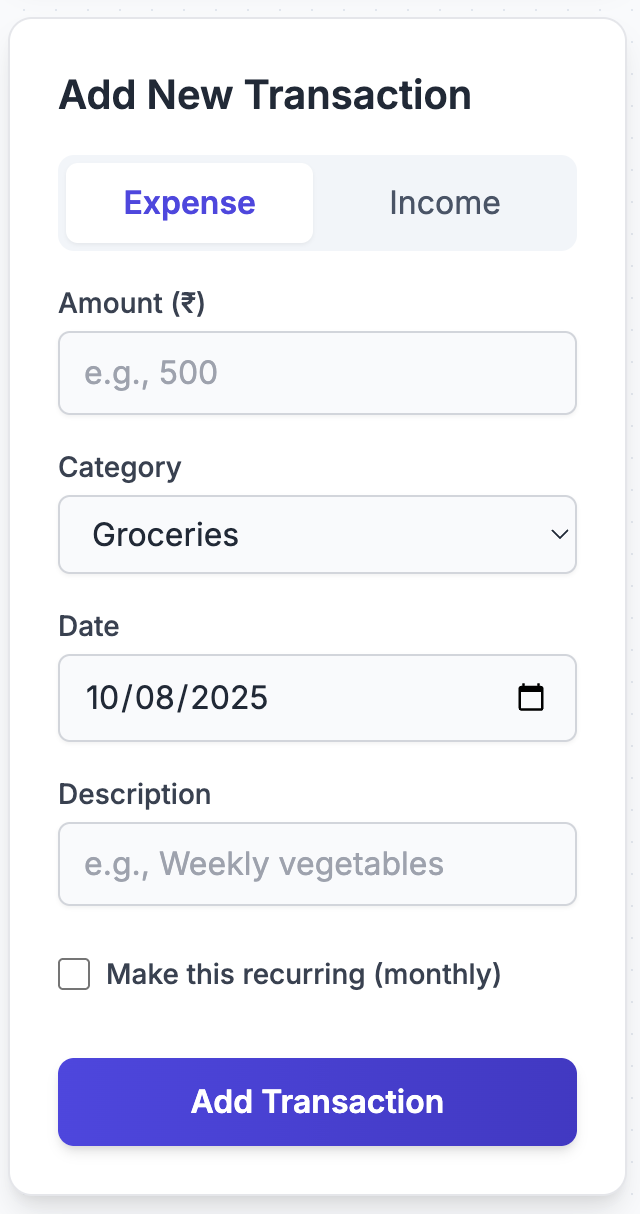
Track Everything
Log income and expenses, set recurring transactions, and manage all your financial accounts in one place.
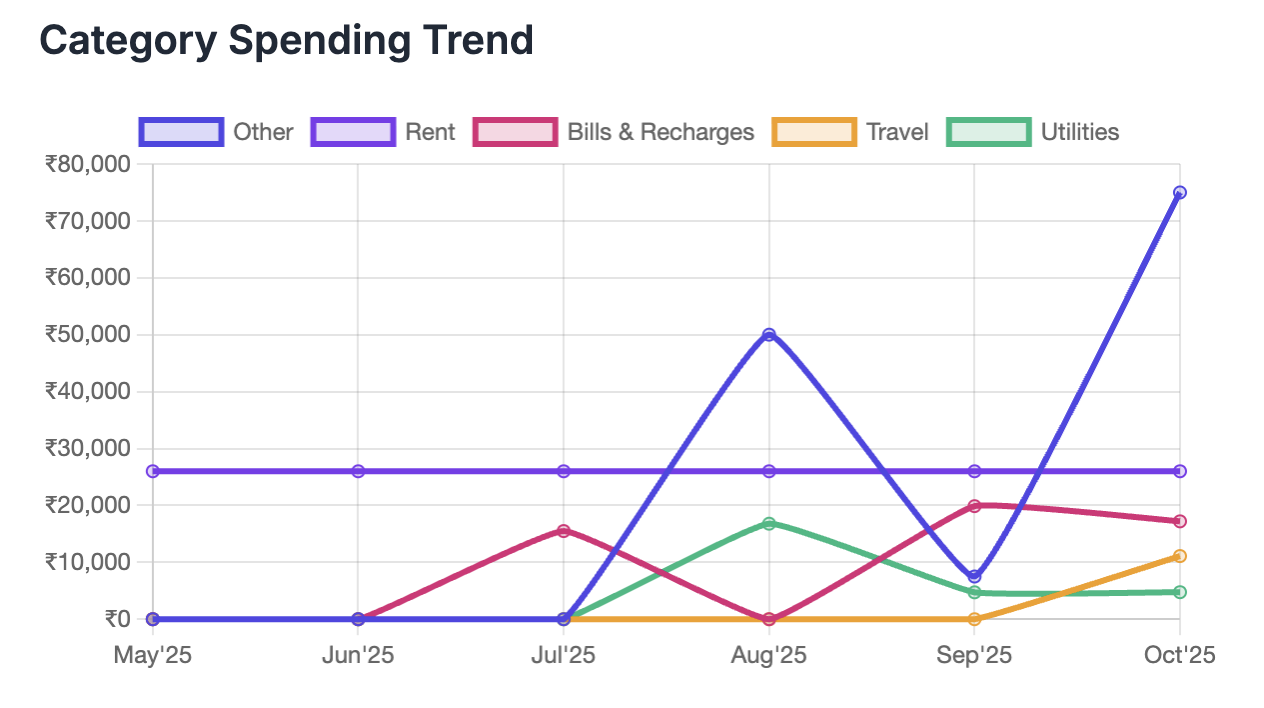
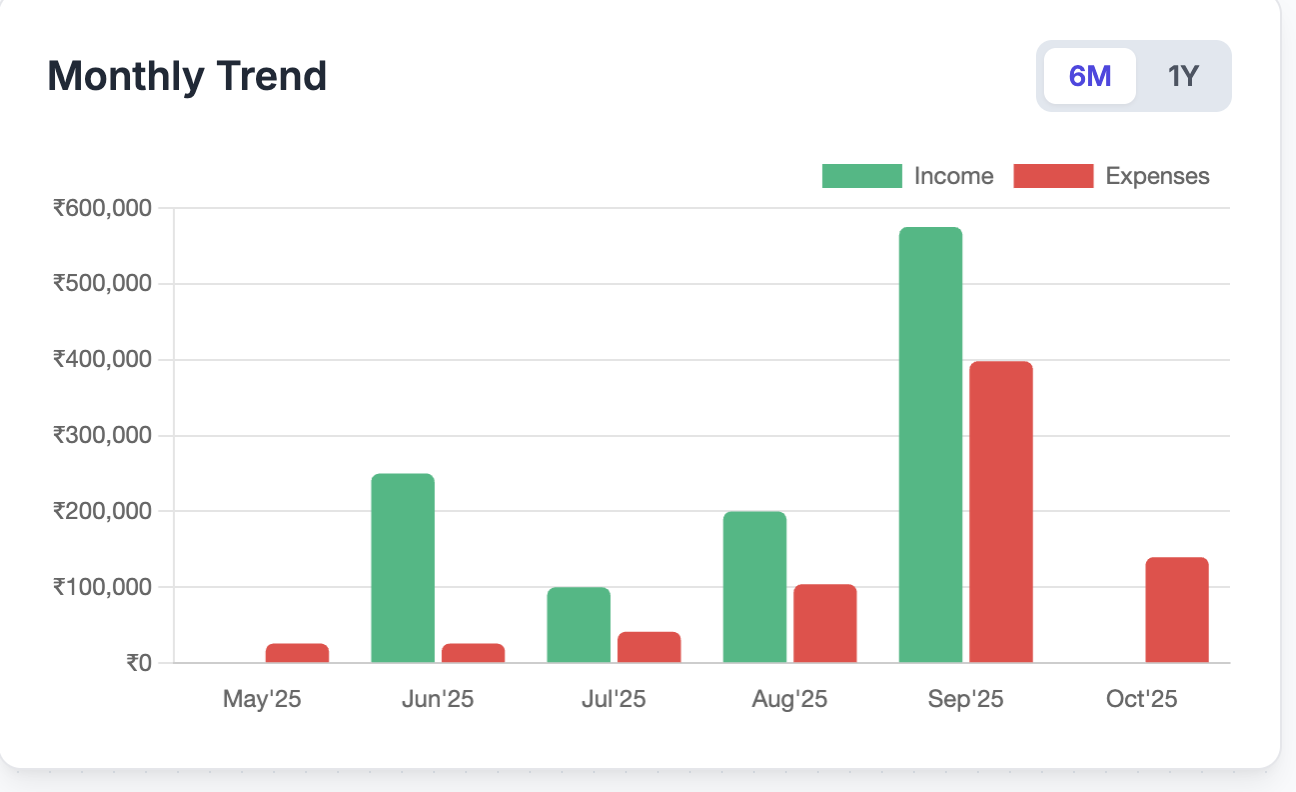
Visualize Your Finances
Understand where your money goes with beautiful charts for monthly trends, category breakdowns, and weekly spending patterns.
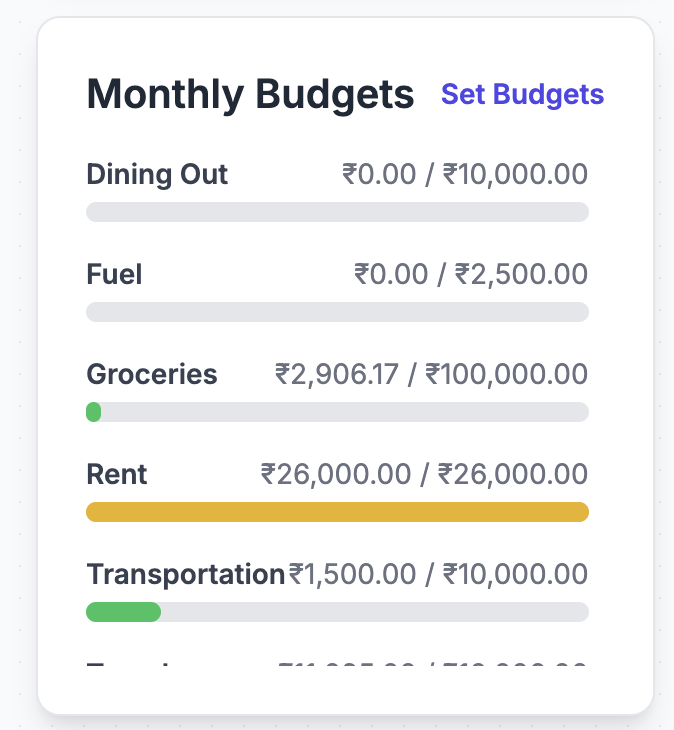
Plan & Achieve Goals
Set monthly budgets for categories and create financial goals to track your progress towards your dreams.
Get Started in Seconds
Sign In Securely
Use your Google account for a fast and secure login. No new passwords to remember.
Add Your Data
Start by adding your accounts, budgets, and first few transactions, or import them from a CSV file.
Gain Clarity
Watch your dashboard come to life with insights that help you understand and improve your financial habits.
Latest News
October 7, 2025
Kaasu Web App is Now Live as Kaasu.app!
Kaasu has its own domain now,- Kaasu.app.
October 4, 2025
Kaasu Web App is Now Live!
We are thrilled to announce that Kaasu is now publicly available as a web app. You can access your financial dashboard from any device with a modern browser to manage your finances on the go. Share the link with your friends and family and start your journey to financial clarity today!
Frequently Asked Questions
Everything you need to know about using Kaasu's transaction types
Think of it this way: Expense and Income change your total wealth, while Transfer just moves money between your own pockets.
💸 Expense
Money leaves your life entirely
- Buying lunch
- Paying rent
- Purchasing laptop
💰 Income
Money comes into your life
- Salary payment
- Gift from parents
- Freelance payment
🔄 Transfer
Money moves between your accounts
- Paying credit card bill
- Moving to savings
- ATM withdrawal
🎯 The Critical Rule:
If the money came from or went to someone else (restaurant, landlord, employer, Amazon), it's Expense or Income. If it moved between accounts you control (your bank, your wallet, your credit card), it's a Transfer.
Credit cards work differently from regular accounts because they represent money you owe. Here's the complete picture:
✅ When you make a purchase with credit card → Record as EXPENSE
Record it exactly like any other purchase, but select your credit card as the account.
Example 1: Coffee at Starbucks
- • Type: Expense
- • Amount: ₹800
- • Category: Dining Out
- • Account: HDFC Credit Card
Result: Credit card balance becomes ₹-800 (you owe ₹800)
Example 2: Amazon Purchase
- • Type: Expense
- • Amount: $120
- • Category: Shopping
- • Account: Chase Visa
🔄 When you pay credit card bill → Record as TRANSFER
When you pay the bill from your bank account, you're moving money from your bank to pay down the liability.
Example: Paying Monthly Bill
Your HDFC credit card bill is ₹15,000. You pay it from SBI account.
- • Type: Transfer
- • Amount: ₹15,000
- • From: SBI Savings Account
- • To: HDFC Credit Card
Result: SBI decreases by ₹15,000, HDFC credit card moves toward ₹0
⚠️ Why this matters:
If you record the ₹800 Starbucks purchase as a Transfer, the app thinks you just moved money around without spending it. Your expense tracking will be completely wrong, and you won't see that ₹800 in your Dining Out category.
No, that's correct! Negative balances in liability accounts represent debt - money you owe.
Understanding Credit Card Balances:
📊 Real Example Flow:
- Day 1: Start with credit card balance at ₹0
- Day 5: Spend ₹2,000 on groceries (Expense from credit card)
→ Credit card balance: ₹-2,000 (you owe this) - Day 12: Spend ₹3,500 on dining (Expense from credit card)
→ Credit card balance: ₹-5,500 (you owe this) - Day 30: Pay ₹5,500 from bank (Transfer to credit card)
→ Credit card balance: ₹0 (debt cleared)
💡 What about Net Worth?
Your total net worth stays accurate. Kaasu calculates your true financial position by subtracting liabilities from assets. If you have ₹50,000 in your bank and ₹-15,000 on your credit card, your net worth is ₹35,000.
Record exactly what you paid - the actual amount that left your bank account.
Scenario 1: Full Payment
Credit card shows ₹-18,500 (you owe ₹18,500). You pay the full amount.
- • Type: Transfer
- • Amount: ₹18,500
- • From: Your Bank
- • To: Credit Card
Result: ₹-18,500 → ₹0
Scenario 2: Minimum Payment
Credit card shows ₹-25,000, but you only pay ₹2,000 minimum.
- • Type: Transfer
- • Amount: ₹2,000
- • From: Your Bank
- • To: Credit Card
Result: ₹-25,000 → ₹-23,000
Scenario 3: Overpayment
Credit card shows ₹-5,000, but you paid ₹7,000.
- • Type: Transfer
- • Amount: ₹7,000
- • From: Your Bank
- • To: Credit Card
Result: ₹-5,000 → ₹+2,000 (credit)
⚠️ Common Mistake
Don't try to match transfers to specific expenses. If you made 30 credit card purchases totaling ₹18,500 and then paid the bill, you record 30 Expenses throughout the month + 1 Transfer when you pay. The Transfer amount might not match any individual expense.
Yes, create a separate liability account for each credit card you use. This keeps spending and balances accurate for each card.
Example Setup:
- • HDFC Regalia Credit Card (Liability Account)
- • SBI SimplyCLICK Credit Card (Liability Account)
- • ICICI Amazon Pay Card (Liability Account)
Why This Matters:
Scenario: You have two credit cards with different billing cycles.
❌ Without Separate Accounts:
- You can't track which card you used for what
- You can't see individual card balances
- You can't track when you paid which bill
✅ With Separate Accounts:
- ₹5,000 dining on HDFC → Track separately
- ₹3,000 shopping on SBI → Track separately
- Pay HDFC bill ₹5,000 → Clear that specific liability
- Pay SBI bill ₹3,000 → Clear that specific liability
Each card's balance tells you exactly what you owe on that specific card, making it easier to manage multiple cards and their different due dates.
This is a Transfer - money moved from your bank account to your wallet, but you haven't spent it yet.
Recording the Withdrawal:
- • Type: Transfer
- • Amount: ₹5,000
- • From: Your Bank Account
- • To: Cash/Wallet
Then Record Expenses When You Spend the Cash:
₹200 for auto-rickshaw
Expense • From: Cash/Wallet • Category: Transportation
₹800 for vegetables
Expense • From: Cash/Wallet • Category: Groceries
₹150 for tea and snacks
Expense • From: Cash/Wallet • Category: Dining Out
What if you don't track individual cash expenses?
If tracking every small cash purchase is too tedious, you have two options:
Option A: Treat ATM withdrawal as expense
₹5,000 → Expense (Category: Cash/Misc)
Less accurate but simpler
Option B: Create one expense when cash runs out (Recommended)
When your ₹5,000 is gone, record Expense of ₹5,000 for "Cash Spending"
Captures that you spent it, keeps bank balance accurate
This is Income - money came from outside into your accounts.
If it came to your bank:
- • Type: Income
- • Amount: ₹20,000
- • Category: Gift / Family Support
- • Account: Your Bank Account
If they gave physical cash:
- • Type: Income
- • Amount: ₹20,000
- • Category: Gift
- • Account: Cash/Wallet
💡 Why it's not a Transfer:
Your parents' money and your money are separate - this increased your total wealth. A Transfer would mean moving between accounts YOU control.
Similar Income Examples:
- • Birthday gift money from relatives → Income
- • Scholarship payment → Income
- • Sold your old phone to a friend → Income (Category: Sale of Item)
- • Roommate paid you back for groceries → Income (Category: Reimbursement)
This is an Expense - money left your life entirely and went to your landlord.
How to Record:
- • Type: Expense
- • Amount: ₹15,000 (or $1,200)
- • Category: Rent/Utilities or Rent
- • Account: Your Bank Account
- • Date: The day payment was made
⚠️ Why it's not a Transfer:
Your landlord's account is not YOUR account. Money left your control and went to someone else, which is always an Expense.
All these are Expenses, not Transfers:
- • Electricity bill paid online → Expense
- • Mobile recharge → Expense
- • Sending money to parents → Expense (Category: Family Support)
- • Paying friend back for dinner → Expense (Category: Dining Out)
- • Donating to charity → Expense (Category: Charity)
✅ This is a Transfer:
Moving ₹15,000 from savings to checking to have enough for rent → Transfer
Then paying rent from checking → Expense
There are multiple approaches depending on how detailed you want to be:
Option 1: Record Net Expense (Simplest)
Dinner was ₹2,400, two friends paid you back ₹600 each (₹1,200 total).
Record: Expense of ₹1,200 (Category: Dining Out)
Only record what YOU actually spent
Option 2: Record Everything (Most Accurate)
Step 1: Record the full dinner expense
Expense: ₹2,400 (Category: Dining Out, Account: Your Credit Card)
Step 2: When friends pay you back
Income: ₹600 (Category: Reimbursement, Account: Bank/UPI)
Income: ₹600 (Category: Reimbursement, Account: Bank/UPI)
Which to Choose?
- Use Option 1 if you're splitting in real-time
- Use Option 2 if you paid the full amount and got reimbursed later - this shows your actual cash flow and is important if tracking credit card spending
Similar Scenarios:
- • Paid ₹800 for cab, friend gives ₹400 → Record ₹400 Expense OR ₹800 Expense + ₹400 Income
- • Bought ₹3,000 groceries for house, roommate owes ₹1,500 → When they pay, it's Income (Reimbursement)
This is a Transfer - you're moving money between two accounts you own.
How to Record:
- • Type: Transfer
- • Amount: ₹50,000
- • From: Savings Account
- • To: Fixed Deposit Account
- • Date: Day you made the FD
Similar Transfers:
- • Moving money savings → checking → Transfer
- • Moving money checking → investment account → Transfer
- • Depositing cash into bank → Transfer (From: Cash, To: Bank)
- • Taking money out of FD back to savings → Transfer (From: FD, To: Savings)
💰 When the FD Matures and You Get Interest:
The interest payment is Income:
• Type: Income
• Amount: ₹3,200 (the interest earned)
• Category: Interest/Investment Return
• Account: Savings Account (where interest is paid)
Important: The principal (original ₹50,000) moved back is a Transfer. The interest (₹3,200) is Income. Don't record the total ₹53,200 as Income - only the new money you earned.
A refund is negative Expense or Income - both approaches work, depending on timing.
If you haven't recorded the original purchase yet:
Don't record anything (the purchase never happened)
Approach 1: Negative Expense (Recommended)
Original: ₹2,500 shirt → Expense
Got refund:
- • Type: Expense
- • Amount: -₹2,500
- • Category: Shopping (same as original)
- • Account: Credit Card/Bank
Approach 2: Record as Income
Got refund:
- • Type: Income
- • Amount: ₹2,500
- • Category: Refund
- • Account: Credit Card/Bank
💡 Why Approach 1 is Better:
It cancels out the original purchase in your Shopping category, giving you accurate spending totals. Your Shopping category will show net spending after returns.
More Refund Examples:
- • Cancelled Swiggy order refund → Negative Expense (Take Out category)
- • Deposit returned after moving out → Income (Refund category)
- • Cancelled flight ticket → Negative Expense (Travel category)
If you're adding a credit card you've already been using, you need to set it up correctly:
Step 1: Create the Liability Account
- • Add new account
- • Account Type: Liability
- • Name: "HDFC Regalia" (or whatever your card is)
Step 2: Set the Starting Balance
Check your credit card app or statement for current outstanding balance:
- • If you owe ₹12,000: Set starting balance as ₹-12,000
- • If you have zero balance: Set starting balance as ₹0
- • If you overpaid and have ₹500 credit: Set starting balance as ₹500
Step 3: Start Recording New Transactions
From now on, record all credit card purchases as Expenses from this card, and all bill payments as Transfers to this card.
Don't try to backfill old transactions unless you want a complete history. Just start from today with the correct current balance.
Example Setup:
- Today: ICICI card statement shows you owe ₹8,500
- Create: Account "ICICI Amazon Pay" (Liability) with starting balance ₹-8,500
- Tomorrow: Spend ₹400 on groceries → Expense from ICICI card → Balance becomes ₹-8,900
- Next week: Pay ₹5,000 → Transfer from bank to ICICI card → Balance becomes ₹-3,900
Any account that represents debt or money you owe should be a liability account. The balance will show as negative to represent what you owe.
Common Liability Accounts:
- • Credit Cards - HDFC, SBI, ICICI, Chase, Amex, etc.
- • Personal Loans - Car loan, education loan, personal loan from bank
- • Money borrowed from friends/family - If you track these
- • Buy Now Pay Later services - Amazon Pay Later, Simpl, LazyPay
Example: Education Loan
- Setup: "Education Loan" as liability account with starting balance ₹-5,00,000
- Monthly EMI: Pay ₹15,000 → Transfer from Bank to Education Loan → Balance becomes ₹-4,85,000
- Interest charge: Bank charges ₹2,000 interest → Expense (Category: Interest/Fees, Account: Education Loan) → Balance becomes ₹-4,87,000
❌ Don't use liability accounts for:
- • Regular bank accounts (even if overdrawn temporarily)
- • Debit cards (they draw from your bank account)
- • Cash/wallet
- • Savings, checking, or investment accounts
Understanding how transactions impact regular accounts vs liability accounts helps you catch errors:
💸 EXPENSE
From regular account:
Balance decreases
₹500 from bank → Bank drops ₹500
From liability account:
More negative (debt increases)
₹500 from CC → ₹-1,000 to ₹-1,500
💰 INCOME
To regular account:
Balance increases
₹10,000 salary → Bank rises ₹10,000
To liability account:
Less negative (debt decreases)
₹500 cashback → ₹-2,000 to ₹-1,500
🔄 TRANSFER
Regular to regular:
Money moves
Savings ↓, Checking ↑
Regular to liability:
Paying off debt
Bank ↓, CC less negative
❌ Common Mistake 1:
Wrong: Recorded ₹5,000 credit card payment as Expense from bank
→ Bank balance drops ₹5,000 (correct), but credit card balance stays at ₹-15,000 (wrong - should be ₹-10,000)
✓ Fix: Delete the Expense, record as Transfer from bank to credit card
❌ Common Mistake 2:
Wrong: Recorded ₹2,000 credit card purchase as Transfer from bank to credit card
→ Credit card becomes less negative (wrong - you didn't pay it off), and bank drops (wrong - you didn't use bank money)
✓ Fix: Delete the Transfer, record as Expense from credit card
❌ Common Mistake 3:
Wrong: Set up credit card as regular account instead of liability account
→ Balance goes positive when you spend, which looks like you're gaining money
✓ Fix: Delete the account, recreate as liability account, re-enter transactions
✅ Quick Verification:
- • Regular accounts (bank, cash): Should match your actual balance and be positive (or close to zero)
- • Liability accounts (credit cards): Should be negative and match what your credit card app/statement shows you owe
Yes. Your privacy and security are our top priorities. All data is encrypted both in transit (between your browser and the server) and at rest (in the database). We use Firebase Authentication, which means you log in directly with your Google account, and we never see or store your password.
No. The app is designed so that your data is stored in a private space tied to your unique user ID. Even the developers of Kaasu cannot access the personal financial data you enter. Each user's data is completely isolated and only accessible to them when they are logged in.
Yes, Kaasu is completely free to use. All the features you see are available to you at no cost.
Ready to Take Control?
Start your journey to financial clarity today. It's free, secure, and simple.
Launch Kaasu Now